
Warby Parker Advisor
Bringing digital and in-store together to help customers feel confident, supported, and in the know every step of their eyewear journey.
Project Overview
This conceptual project enhances Warby Parker’s Advisor experience by making personalized frame picks clearer, more insightful, and connected to in-store availability — bridging digital discovery with in-store confidence.
My Role
UX Designer
Researcher
My Responsibilities
Synthesized user research and industry insights
Designed features connecting digital and in-store experiences
Built and iterated prototypes through unmoderated testing
Advocated for user needs in design decisions
Constraints
6-week timeline
Limited access to moderated user testing
Scoped enhancements within existing Advisor platform
Adhered to brand guidelines
“Virtual Try-On is Clutch. I'm addicted to virtually trying on glasses, and it is really amazing technology. Ordering glasses through WP is so easy and fun, start to finish”
Source: Warby Parker App Testimonial | @EMChaz
Key Challenge
Customers loved their Advisor Picks but couldn’t easily confirm in-store availability, creating a confidence gap when planning their visit.
Opportunity
Bringing in-store availability into view within Advisor Picks helps turn uncertainty into clarity, and makes the transition from app to store feel seamless.
Warby Parker Advisor
Advisor has grown from helpful recommendations to a smooth, confident journey that connects online picks with in-store know-how.
Impact
“Why This Pick?” boosts confidence by clearly explaining why each frame is recommended.
“Plan Your Visit” makes visiting a Warby Parker store effortless, with 100% task success for try-on lists and appointment scheduling in usability tests.
Personalized curation delights by narrowing choices thoughtfully, helping customers find their perfect pair with ease.
Project Background
This conceptual project, inspired by real challenges in the eyewear retail space, is informed by user research and conversations with industry experts, including a Warby Parker design leader. During my time as an Advisor supporting Warby Parker’s omnichannel experience, I noticed two key challenges:

Too Many Choices,
Too Little Clarity
Customers often felt overwhelmed by the number of frame options, leading to decision fatigue, less confident shopping experiences, and potentially abandoned carts or reduced customer retention

Limited Time for
Personal Attention
Advisors and Opticians dedicate valuable time guiding customers through frame and lens decisions
Long interactions can slow down service, especially during busy times
Disclaimer: This project is a conceptual design exercise developed as part of the Designlab UX Academy program. It is inspired by real-world challenges in the eyewear retail environment and informed by discussions with industry professionals. However, it is not an official Warby Parker project, and the designs presented are for educational and portfolio purposes only.Reframing the Challenge
At first, this project explored a potential in-store solution: a “Digital Advisor VTO Mirror” to guide frame selection, reduce overwhelm, and free up staff for deeper conversations.
But as research progressed, the focus shifted and revealed something more urgent: a disconnect between digital recommendations and in-store follow-through, revealing a break in the omnichannel experience.
Instead of introducing new hardware, the opportunity became clear: Enhance the existing Advisor experience to better bridge digital discovery with in-store confidence.
Customers and the Competitive Landscape
By understanding both customer expectations and how top brands bridge digital and physical channels, we identified key opportunities to strengthen the Advisor journey
User Interviews
Explores why customers who’ve used the Advisor app still visit stores, and what they expect from the in-store experience
5 participants interviewed

All participant data anonymized for privacySWOT Analysis
We looked at four brands across eyewear, beauty, and home decor to see how they blend digital and in-store experiences
The goal was to understand how they build trust, guide decisions, and create seamless customer journeys

Research Goals

Goal 1
Understand why customers still visit stores after using the Advisor app, and what that reveals about the value of in-person experiences.
Goal 2
Uncover what customers expect from their in-store visit, so we can align the retail experience with their digital-first mindset.
Goal 3
Learn how the Advisor app shapes in-store behavior, to design a more seamless, connected journey from app to store.
User Interview Key Themes

Building Trust in Digital Tools
Privacy concerns limit engagement
Product terms can feel unclear or technical
Virtual Try-On must feel accurate and inclusive for prescription wearers

Digital Guidance Meets Human Expertise
Advisor Picks help, but aren’t the full picture
Human guidance adds needed context and confidence

Connecting Online Discovery to In-Store Confidence
Uncertainty about what to expect before visiting
Interest in better in-store tools that reflect their app experience
Understanding the Competitive Landscape
SWOT analysis focused on user interview insights and competitive context

Building Trust and Clarity in Digital Tools is Crucial
Simplify product terminology to reduce confusion and increase engagement
Address data privacy concerns that currently limit user adoption
Improve Virtual Try-On accuracy and functionality, especially for prescription wearers, to build confidence in digital try-ons

Blending Digital Convenience with Human Expertise
Bridge gaps in digital guidance with expert, personalized support
Customers want a mix of smart recommendations and human reassurance
A hybrid approach builds trust and supports confident decision-making

Creating a Seamless Online-to-Store Journey
Customers expect a smooth transition from app to store
Pre-visit concerns should be addressed clearly and proactively
In-store tools should reflect digital preferences and continue the personalized journey
Problem Statement
At Warby Parker, we believe finding your perfect pair should be effortless and inspiring. However, customers like Alex sometimes face uncertainty with digital selections and a disconnected journey to in-store visits.
To address this, we aim to provide crystal-clear, personalized insights for Advisor Picks and enable seamless in-store planning. Our goal is to empower every customer, transforming hesitation into confidence from the first click to the final fitting.
Persona

“I appreciate how easy Warby Parker's Advisor is, but with my strong prescription, I really need to understand why a frame works for me. I want to feel absolutely confident this is the right choice before I even step into a store.”
Alex | The Empowered Skeptic

Clarity Builds Confidence
Wants smart, trustworthy recommendations, especially for high prescriptions and tricky fit needs.

Seamless Transitions Matter
Values a smooth handoff from app to store.
How Might We (HMW) Question
HOW MIGHT WE
Improve Warby Parker's digital and in-store experience
SO THAT OUR
Customers like Alex, who seek confident, clear, and secure digital recommendations for complex needs (like strong prescriptions and frames sliding) and desire a seamless transition from app insights to in-person expertise
ARE SUPPORTING
Greater trust, enhanced engagement, more confident decision-making, and a truly effortless eyewear journey
THROUGH
Higher usage of personalized Advisor Picks explanations, increased pre-planned in-store visits, improved app-to-store conversion rates, and ultimately, greater customer satisfaction and purchases?
We’re not just recommending frames, we’re guiding the entire journey.
Design Strategy
To empower customers like Alex with confidence at every step, we’re designing intuitive, personalized features that make Advisor Picks easy to understand and act on. By seamlessly connecting digital discovery with in-store planning, the experience becomes not only clear, but genuinely delightful.
A Strategic Look
How Alex confidently explores personalized frame recommendations and effortlessly plans a tailored in-store visit to find the perfect fit.
Task Flow 1 - Plan Your Visit
What
Alex books an eye exam and a personalized try-on with an Optician in just a few clicks, making it easy to confirm their Advisor Picks and find the perfect fit, no guesswork required.
Why
This smooth handoff from online to in-store helps Alex feel prepared and confident, turning “maybe later” into “can’t wait.”
Task Flow 2 - Why This Pick?
What
Alex confidently explores personalized Advisor Picks and quickly gets why each frame was chosen, whether it’s the high-prescription-friendly frame or a flattering fit for their face shape.
Why
By clearly showing the why behind every recommendation, we build trust and remove doubt, giving Alex the clarity and confidence to say, “Yep, that’s the one.”
Early Exploration: Advisor Flow & In-Store Planning

Advisor Picks
Reviewing personalized recommendations

VTO - Why this Pick?
Understanding why a frame was recommended

VTO - Add to Store Try-On
Preparing to try selected frames in-store

Appointment Booking
Scheduling an in-store visit to finalize choices
Virtual Try-On (VTO), Made Smarter
“Why This Pick?” in VTO
Challenge
How might we surface frame recommendations in VTO without disrupting the experience? The goal was to make “Why This Pick?” easy to find and quick to understand, right when it matters most.
Solution
We added a simple, well-placed button that gives users instant access to personalized insights, keeping the experience clear, helpful, and seamlessly interactive.

Discoverability

Understanding
Plan Your Visit, Made Simple
Store Try-On Appointment
Challenge
How might we help users confidently plan a store visit, clearly showing which frames they’re picking, where they’re going, and how to include services like an eye exam?
Solution
We created a seamless, guided flow that confirms store location up front and displays selected frames as mini product cards with quick-remove options. A clear “X of 5 frames chosen” counter and add-more prompt encourage users to fill their try-on list.
Optional services like an eye exam can be added in just a tap, seamlessly integrating Warby Parker’s existing exam booking flow right within the Store Try-On appointment flow.

Selecting frames

Adding services
Building on the Brand
The UI kit reinforces Warby Parker’s design language, prioritizing consistency, scalability, and clarity across the Advisor experience.
Bringing the new Advisor into Focus
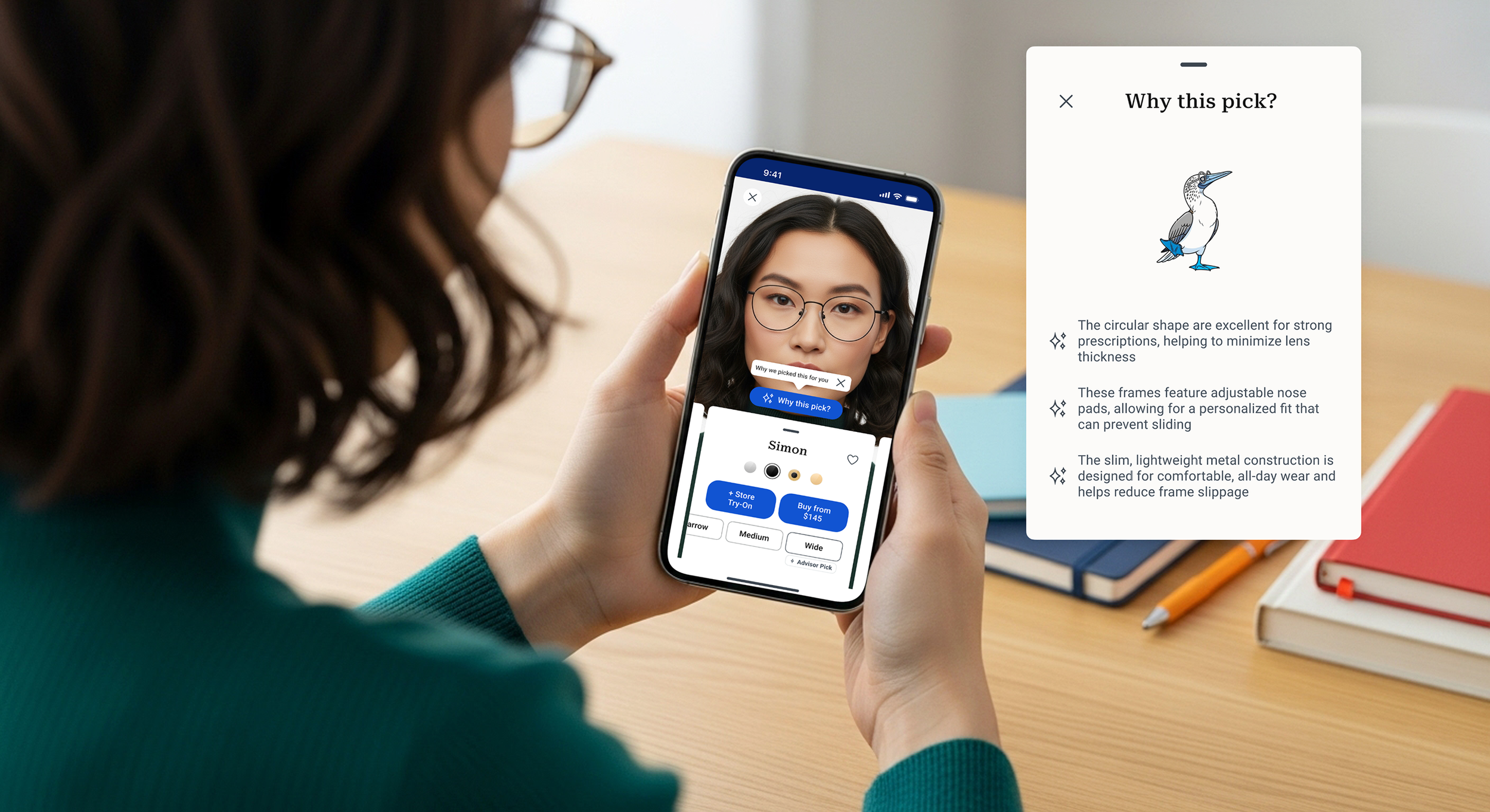
Why This Pick?
Smarter picks, clearly explained to build confidence in each frame recommendation.
Features
Advisor Picks now includes short, personalized insights that show why a frame was selected for the user
Right on the Advisor Picks screen, users will see contextually relevant notes
This builds trust, reducing second-guessing, and turning hesitation into confidence
Virtual Try-On (VTO)

VTO - Why this Pick?

Plan Your Visit
Bridging Advisor Picks with in-store visits seamlessly, making it easy for users to plan their store visit with purpose.
Features
The app highlights nearby stores that carry frames available for store try-ons
A “+ Store Try-On” button lets users save favorite frames to a dedicated in-store try-on list
This blends digital ease and in-person expertise, to enable a smooth, guided experience and personalized support for stronger prescriptions and fitting needs
Store Try-On Services

Store Try-On Appointment

Usability Testing the new Advisor
Goal 1
Evaluate How Clearly “Why This Pick?” Explains Frame Recommendations
Goal 2
Assess the Ease and Value of the “Plan Your Visit” Experience
Goal 3
Understand How the Experience Impacts Confidence in Choosing Frames and Visiting the Store
Unmoderated Testing
Participants explored personalized frame picks and planned a store visit from Alex’s perspective to confirm their choices and ensure the right fit.
Participants
5 participants

All participant data anonymized for privacyMaze Usability Testing
12 Tasks (prototype test, opinion scale, simple input)

Positive Highlights

“The idea of an online advisor that tailors recommendations to my specific needs, like glasses slipping down the bridge of my nose, is really helpful. I haven't seen that kind of personalization before.”
Goal 1 Met
Shoppers found the “Why This Pick?” feature clear and helpful—it didn’t just list frame features, it explained why they mattered, making the experience feel personal and easy to understand.
Goal 2 Met
Every step of “Plan Your Visit” felt seamless. From adding frames to booking an eye exam, participants felt well-prepared and appreciated how easy it was to tailor their in-store visit.
Goal 3 Met
Even without a pre/post survey, feedback was clear: the new experience gave users more confidence in finding the right frames and getting ready for their visit.
Design Recommendation Prioritization
4 Prioritized Revisions
Enhance Discoverability of In-Store Availability
Re-evaluate Virtual Try-On Button Prominence
Address Minor UI/Visual Inconsistencies
Allow for Alternative Task Flows
Notable Learning

“I browsed the recommended frames but couldn’t tell which ones were available at the Warby Parker store.”
Enhance Discoverability of In-Store Availability
Challenge
Implement clear visual indicators directly on the Advisor Picks screen, reducing friction in the key "Plan Your Visit" flow by making it easier for users to identify relevant frames for in-store try-on.
Solution
Softly indicating shopping context (Store mode) in header, updated to “Top picks nearby”. Store location card placed directly beneath header to create a clear visual and spatial link between the recommendation context and the selected store.
Advisor Picks (Before)
Advisor Picks (After)
Prioritized Revisions
Advisor Picks (Store Mode)
Product Info Screen
Add to Store Try-On
Warby Parker Advisor

Lessons Learned
Overall Strategic Impact
Interestingly, Warby Parker announced the sunset of their Home Try-On program shortly after my project concluded, a decision that further validated the need for my proposed “Why This Pick?” feature. This highlighted how design can support evolving customer needs when physical touchpoints disappear.
Proudest Moment: Seeing users navigate the “Why This Pick?” and “Plan Your Visit” features with ease and confidence was a real highlight. Thoughtful design turned uncertainty into decisiveness and joy.
Steering this project from initial observations to a polished, people-first solution helped me sharpen a clear UX vision, one that stayed true to Warby Parker’s mission of making eyewear more accessible, delightful, and clear, both in vision and experience.
What Went Well
When research insights challenged our early assumptions, we didn’t hesitate to pivot. Staying grounded in user needs made the final solution smarter and more relevant.
These updates to Advisor supported both customers and in-store Advisors/Opticians. The result was a smoother, more connected experience for everyone involved.
Maintained Warby Parker's unique clever and approachable tone throughout the design process, ensuring the new features felt like a natural, beloved extension of the brand.
Next Steps
Explore the post-launch impact through the eyes of our retail Advisors and Opticians. We’ll dive into how these new features fit into their day-to-day workflows, and how they’re helping deliver an even more seamless, personalized customer experience.
In future unmoderated tests, we’ll make sure our intro instructions are crystal clear, so participants instantly understand how to interact with the prototype, where to click, and how to move forward without second-guessing.
We’ll build future prototypes with more open-ended, flexible paths, inviting users to explore and complete tasks in a way that feels intuitive to them, rather than sticking to a fixed, linear flow.
All product images, logos, and trademarks belong to their respective owners and are used here for illustrative, non-commercial portfolio purposes. Some visuals and text in this case study were generated or assisted by AI tools; all design decisions and insights are my own.