
Rivian Command
Designing a connected digital companion that helps riders plan and prepare with confidence while combining clarity, reliability, and Rivian’s spirit of exploration.
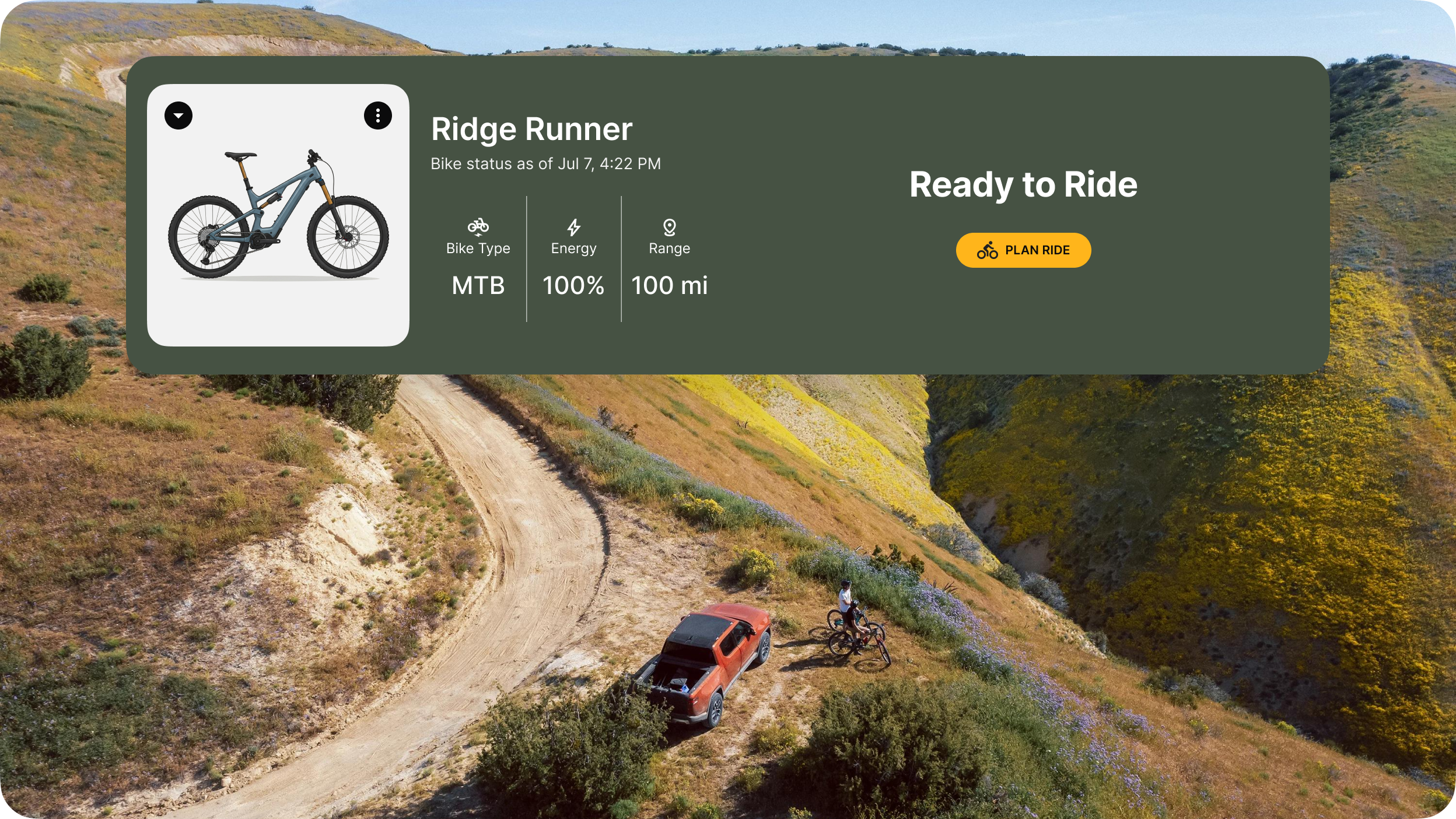
Project Overview
This conceptual project enhances the e-bike experience by simplifying ride planning, surfacing real-time trail data, and aligning with Rivian’s brand spirit — bridging confident exploration with intuitive, connected digital tools.
My Role
UX Designer
Researcher
My Responsibilities
Champion user needs and advocate for clarity
Streamline information architecture for intuitive navigation
Design responsive user interfaces for cross-platform consistency
Lead usability tests and incorporate insights
Constraints
6-week timeline (extended from 4)
Challenge in recruiting core micromobility users led to inclusion of analogous group (urban commuters) for user research and usability testing
Prioritized Rivian’s brand and design system over speculation on Also Inc., which launched near the project’s end
MVP scope focused on prioritizing research-driven features aligned with user needs, optimized for a responsive web design
“It’s becoming more and more visible that it’s also a digital experience, and riders do expect that. They expect a way of interacting with the product, being able to customize it to their needs.”
Source: GovTech | Alex Gmelin, Chief Product Officer at Comodule
Key Challenge
Reduce uncertainty and complexity in e-bike ride planning by addressing real-time trail conditions, terrain variability, and bike performance while empowering riders to explore with greater confidence and ease.
Opportunity
Design a seamless digital companion that extends Rivian’s brand into micromobility by simplifying ride planning, reducing friction in bike ownership, and supporting confident, trail-focused exploration.
Rivian Command
A responsive digital dashboard designed to enhance the e-bike experience by simplifying ride planning, surfacing real-time trail and bike data, and extending Rivian’s adventure-first brand into the micromobility space.
Impact
Built Strong Rider Confidence
User testing revealed a high confidence rating of 4.5 out of 5 in ride preparation, confirming that the dashboard effectively consolidates essential information such as battery status, weather, and trail conditions to empower riders to feel ready and in control.
Achieved Clear and Intuitive Dashboard Design
The dashboard scored 4.2 out of 5 for clarity, demonstrating that users found the interface approachable and easy to navigate as a central hub for their e-bike management.
Delivered Consistent Cross-Platform Usability
Mobile usability received a 4.3 out of 5 clarity rating, showing the design’s success in providing a seamless, coherent experience across devices, ensuring riders can access key information anytime, anywhere.
Project Background
This project explores how Rivian could expand into micromobility, lightweight electric vehicles such as e-bikes and scooters designed for short-distance travel. Centered on the adventure-oriented side of this space, the concept envisions how Rivian’s brand could extend to an electric mountain bike and its connected digital experience. Although Also Inc. was announced earlier, its launch came near the project’s end, and the focus remained on Rivian’s core brand and design system to deliver a cohesive, user-centered e-bike companion experience.
Extending Rivian’s Brand Through Connected Experiences
Designed a digital platform that reflects Rivian’s adventure-driven identity while supporting both on-bike and off-bike user needs
Prioritized systems thinking to connect hardware, environmental data, and user interaction within one seamless interface
Responding to Micromobility Market Shifts
Positioned the experience within the fast-evolving micromobility space, aligning with Rivian’s strategy without relying on announced but unlaunched ventures like Also Inc.
Addressed rising user expectations for real-time, personalized ride planning in unfamiliar environments
Designing for Confidence and Clarity
Exploring what micromobility riders need from a connected platform that supports confident trip planning and preparation.
User Research
Explored how riders plan trips and what data builds confidence before starting a ride
Identified opportunities to simplify pre-ride decision-making and reduce uncertainty
9 participants interviewed across micromobility users (core group) and urban commuters (analogous group)
9 participants were involved in the study:
6 took part in interviews
3 declined interviews but completed a survey

Core Group (micromobility users)

Analogous Group (urban commuters)
Research Goals
Goal 1
Identify the key information riders need to plan confidently and feel prepared before a ride
Goal 2
Explore which post-ride insights and data points provide meaningful reflection and motivation
Goal 3
Define how a digital companion can simplify decision-making and reduce uncertainty across devices
What We Learned from Users
Pre-Ride Planning & Route Selection
Riders struggle to trust digital route planners due to unreliable or unsafe bike routing in current apps.
Confidence grows when time estimates, route quality, and safety indicators are accurate from the start.
Users want a tool that justifies route choices and supports readiness with clear, actionable pre-ride information.
Post-Ride Analysis & Motivation
Riders are motivated by meaningful feedback that quantifies effort and progress, not just metrics.
Comparing e-bike performance to driving or physical exertion helps reinforce accomplishment and ongoing motivation.
Personalized summaries can strengthen engagement and encourage continued riding behavior.
User Experience & Information Hierarchy
Users value simplicity — they want essential ride data presented clearly, without clutter or overload.
Real-time updates and proactive alerts are critical for confidence and safety.
A unified interface across devices is preferred over fragmented tools that force riders to switch contexts.
Problem Statement
Urban commuters and micromobility users struggle with fragmented, unreliable, or overwhelming ride-planning tools. They need a trusted, intuitive digital companion that simplifies decision-making and supports a seamless, end-to-end ride experience within Rivian’s brand ecosystem.
Persona

“I love venturing somewhere new, but I need to know exactly what I’m riding into.”
Reed Jasper | The Intentional Explorer
Integrated, Clear Experience
Wants one seamless platform combining route planning, bike status, and live updates with transparent data to match their need for reliable, informed rides.
Simplicity Amid Complexity
Frustrated by fragmented tools and cluttered interfaces that obscure critical ride information, clarity is needed to stay focused on ride goals.
Focused, Minimal Interface
Needs a clean, simple design that prioritizes essential information for confident pre-ride planning and preparation.
Design Strategy
Create a seamless digital companion that builds trust by combining route planning, bike status, and real-time updates. Focus on clarity and reliability to support riders throughout their journey, from pre-ride planning to post-ride readiness, simplifying complex data into intuitive insights within Rivian’s existing brand system.
Sitemap: A Scalable Framework for Seamless Rider Journeys
Building a user-centered foundation that supports both the MVP and future platform growth
What
Developed a comprehensive sitemap organizing core MVP features like Ride Planning and the Command Center, while allowing for future expansions such as interactive route building and integrated device data.
Why
A clear, flexible information architecture reduces user confusion and provides a strong foundation for iterative design and scaling.
Focusing on the MVP: Plan Your Ride
Designing a streamlined experience to help riders confidently schedule and manage rides
What
Focused on the “Plan Your Ride” module, including creating new rides, managing favorites, viewing upcoming rides, and quick actions—all designed to simplify the core user journey.
Why
Prioritizing clarity and ease of use in this key workflow helps reduce cognitive load and ensures a seamless, focused ride planning experience aligned with user needs and brand standards.
Designed for Confident Trail Exploration
These features empower riders to explore new terrain with clarity and control. From dynamic route discovery and weather-aware trip cards to detailed e-bike status and real-time trail updates, the experience anticipates what off-road riders need most before every adventure.
Ride Command Center & Dashboard Screen
Dynamic Trip Launcher
Upcoming Trip Card
Actionable Insights
E-bike Status
Ride Planning & Selection Screen
Trail-Smart Routing
Real-time Conditions
Route Justification
Route Management
Mid-Fidelity Wireframes
Dashboard Overview
Challenge
Riders need to see bike status, ride conditions, and route options quickly to plan confidently. How might we deliver all this information in one clear, actionable view?
Solution
The Dashboard organizes information into three key cards:
Dynamic Ride Launcher Card shows bike selection, battery, and range, with easy planning actions.
Current Ride Conditions Card delivers weather, wind, and road status at a glance. The
Recommended Routes Nearby Card surfaces curated routes with key details and recommended bikes.
Together, these cards create a clean, focused command center that helps riders plan and explore with confidence.
Dashboard (Desktop)
High-Fidelity Wireframes
Plan New Ride - Search
Find your next adventure quickly and confidently with a contextual, intuitive search experience.
Features
The search field expands and provides contextually relevant trail suggestions as users type.
Selecting a suggested autocomplete result populates the Recommended Routes Nearby Card with a list of collapsed trail cards and quick-access location options.
Trail cards include hover animations to highlight key details like name, distance, and elevation, and users can sort and filter routes to quickly find the best match.
Plan New Ride – Filters
Help riders quickly narrow down trails based on their preferences, making route discovery faster, more personalized, and aligned with Rivian’s adventure-oriented brand.
Features
A dedicated Filters modal allows users to set required preferences, including sort order, distance away, trail type, and bike profile. Optional inputs let riders refine results with effort preferences, climb tolerance, ride duration goals, and battery strategy.
Filter selections update the Recommended Routes Nearby Card in real time, showing expanded trail cards with a “Why choose this loop” summary that translates user preferences into concise bullet points.
Selected trail cards change to a Rivian primary brand color, signaling adventure readiness and helping riders quickly identify the route they’re committing to.
Plan New Ride – Ride Details
Support riders like Reed who want to feel fully prepared before setting out, with a clear, two-panel layout for customizing and confirming every ride detail.
Features
The left panel allows riders to personalize their ride name, confirm the selected bike, and set preferences for notifications, sharing, and favorites. Notification toggles are integrated with the ride and bike data shown in the right panel, helping ensure readiness and reliability through context-aware alerts.
The right panel features a Ride Preview card displaying the selected route, map preview, and key ride metrics like distance, elevation gain, estimated duration, and ride conditions preview including weather, wind, and trail status.
A dedicated Bike & Battery Check card surfaces sync status, battery level, and tire pressure, reinforcing rider confidence before every adventure.
Usability Testing Rivian Command
Goal 1
Evaluate Clarity and Effectiveness of the Dashboard as a Starting Point
Goal 2
Assess Usability and Perceived Value of the Ride Planning Flow
Goal 3
Evaluate Ease and Confidence in Completing Ride Setup
Goal Extension
Gather Cross-Platform Usability Feedback
Unmoderated Testing
To evaluate the usability of Rivian Command, we conducted an unmoderated test that allowed participants to explore the platform independently while completing tasks designed around the core rider journey. Participants simulated helping Reed, our archetypal user, plan a weekend e-bike ride in Boulder, testing both desktop and mobile experiences.
Maze Usability Testing
13 tasks (prototype test/exploration, opinion scale, simple input)
2 screen formats (desktop, mobile)
8 participants

Desktop

Mobile
Positive Highlights

“I have high confidence because all of these were addressed. Everything else is out of my control, but the alerts and planning are great to have.”
Goal 1 Met
Participants found the dashboard effective as a starting point, with a high average clarity score of 4.1/5.
Goal 2 Met
Once engaged, the filtering features and preparation information were highly valued, giving participants confidence in selecting and customizing routes.
Goal 3 Met
The flow successfully supported users in feeling prepared and ready for their ride, reinforcing the prototype’s core value.
Goal Extension Met
The mobile experience was consistent with desktop functionality.
Design Recommendation Prioritization
3 Prioritized Revisions
Consolidate & Clarify Dashboard CTAs
Optimize Mobile Dashboard Layout
Implement Saved Preference Feature
Notable Learning

“Plan ride and build your route felt a bit confusing. If build your route means plan your route, it seems like it should be part of Plan Your Ride.”
Consolidate & Clarify Dashboard CTAs
Challenge
Despite the visual emphasis on “Plan Ride,” users were confused by the presence of both “Plan Ride” and “Build Route” buttons. The labels did not clearly communicate their distinct purposes, causing misdirection and increased cognitive load.
Solution
Clarify the relationship between “Plan Ride” and “Build Route” by making “Plan Ride” the main entry point and positioning “Build Route” as a secondary or supporting action. This reduces cognitive load, makes the information architecture more intuitive, and helps users reliably start the core ride planning flow.
Before
After
Dashboard (After)
Prioritized Revisions

Plan New Ride - Search

Plan New Ride - Ride Details

Dashboard - Ride Planning Confirmation
Rivian Command

Lessons Learned
Overall Strategic Impact
Designing Rivian Command helped solidify my approach to building clarity within complex, connected ecosystems. By defining a scalable information architecture early, I created a foundation that made ride planning feel simple, trustworthy, and aligned with Rivian’s larger mobility vision.
Proudest Moment: Seeing testers express confidence and preparedness after using the ride setup flow was especially rewarding. It showed how thoughtful structure and clear data presentation can turn uncertainty into confidence for riders preparing for real-world adventures.
What Went Well
When research revealed confusion between planning and route-building, I made information architecture the main design focus. This decision grounded each interaction in clarity and purpose.
Usability testing validated that preparedness insights and filtering tools successfully built user trust. Working within Rivian’s design system helped ensure consistency between digital experience and physical brand identity.
What Could be Improved
In future unmoderated tests, I will provide clearer onboarding instructions to help participants understand prototype interactivity and task flow.
Earlier mobile testing could have offered more insight into balancing visuals with quick access to key information.
Defining clearer success paths before testing would make remote test data more actionable and reduce confusion caused by limited prototype fidelity.
All product images, logos, and trademarks belong to their respective owners and are used here for illustrative, non-commercial portfolio purposes. Some visuals and text in this case study were generated or assisted by AI tools; all design decisions and insights are my own.